Recommend Post

Bitcoin เว็บขุดบิทคอยสายฟรีไม่ต้องลงทุน

Bitcoin เว็บขุดบิทคอยสายฟรีไม่ต้องลงทุน วันนี้ผมจะมานำเสนอเว็บขุดบิทคอยฟรี เว็บพวกนี้ไม่ต้องทำอะไร แค่เราเข้าสู่ระบบแล้วก็เปิดบราวเซอร์กด...

Tuesday, March 25, 2008

Apple iPod nano 8 GB Pink (3rd Generation) Order 3


Apple iPod nano 8 GB Pink (3rd Generation) Order 3


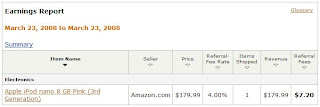
รายรับรอบที่ 3 วันที่ 23 มีนาคม 2551
ในที่สุดของแรงก็เข้าประตู ออเดอร์ส่งเข้ามาติดๆ กัน คราวนี้เป็น Apple iPod nano 8 GB Pink (3rd Generation) สีชมพูหวานปิ๊ง คนที่ซื้อท่าจะเป็นสาวๆ :D

Apple iPod nano 8 GB Pink (3rd Generation)


Apple iPod nano 8 GB Pink (3rd Generation)


From Apple Computer
List Price: $199.00
Price: $178.99 & eligible for FREE Super Saver Shipping on orders over $25.


Product Description
The new iPod nano redefines the word "redesigned." An anodized aluminum top and polished stainless steel back. A larger, brighter screen that is the sharpest iPod display ever. Up to 24 hours of battery life. (1) In fact, just about the only thing that hasn't changed is the name. And now you can enjoy TV shows, movies, video podcasts, and more. Even rent a movie from iTunes and watch it on the go. (2) Available in 4GB and 8GB models, iPod nano puts up to 8 hours of video or 2,000 songs in your pocket. (3) Seamless integration with iTunes means you can shop for videos, music, games, and more on the iTunes Store--24 hours a day, 7 days a week--then sync everything to your iPod nano just by connecting it to your Mac or PC. Even your photos (up to 7,000 of them3) come along for the ride. (1) Rechargeable batteries have a limited number of charge cycles and may eventually need to be replaced. Battery life and number of charge cycles vary by use and settings. For more information, visit www.apple.com/batteries. (2) iTunes movie rentals are available only in the U.S. The iTunes Store is available only to persons age 13 or older in the U.S. and many other countries; see www.itunes.com/download for a list of countries. Requires iTunes 6.0 or later (7.0 or later for video), compatible hardware and software, and Internet access (fees may apply); terms apply. (3)1GB = 1 billion bytes; actual formatted capacity less. 8 hours of video, 2,000 songs, and 7,000 photos refer to 8GB model. Music capacity is based on 4 minutes per song and 128-Kbps AAC encoding. Photo capacity is based on iPod-viewable photos transferred from iTunes. Video capacity is based on H.264 1.5-Mbps video at 640-by-480 resolution combined with 128-Kbps audio. Actual capacity varies by content.

Monday, March 24, 2008

Lesson 2 การเลือกสินค้าและการสร้าง aStore

ก่อนอื่นเราต้องรู้ก่อนนะครับว่าเราอยากขายอะไร สินค้าที่อยู่ใน amazon นั้นก็มีมากมายหลายชนิดให้เราเลือกนำไปเสนอขาย แรกๆ ผมแนะนำให้ลองตีตลาดสินค้าด้านล่าง คือพวกที่ราคาไม่สูงมากนัก $50 ลงมา จะขายง่ายครับ (ยิ่งถูกยิ่งขายง่ายว่างั้น) ผมเองขายได้ชิ้นแรกราคายังอยู่ที่ $50 ลงมาเลยครับ

อย่าเพิ่งไปตีตลาดด้านบนพวกที่ขายของราคาสูง เช่น camera, ipod, gps เทือกนี้ แม้มันจะเป็นสินค้ายอดฮิตก็ตาม แต่พวกเนี้ยเขามีเจ้าที่แล้ว คุณอาจจะไปสู้ aStore คนเก่าๆ ที่เขาทำไว้อยู่ก่อนแล้วไม่ได้

ให้เราเริ่มจากเล็กๆ ขายสินค้าถูกๆ ไปก่อน ถ้าลองร้านเราติดตลาดแล้ว ก็ค่อยขายของแพงๆ ก็ได้ครับ

1. ก่อนอื่นให้ลองเข้าที่เว็บไซต์ amazon.com แล้วลองเสิทหาสินค้าที่เราต้องการดูครับ ในที่นี้ผมเสิทคำว่า barbie ในหมวดของ Toys & Games เมื่อกด GO แล้ว ก็จะเห็นตุ๊กตาบาร์บี้ออกมาเต็มเลยครับ ราคาก็ใช้ได้ ตกลงผมเลือกขายตุ๊กตาก็แล้วกัน
Amazon Make Me Rich Lesson 2

2. จากนั้นให้เรากลับมาที่ amazon associates คลิกที่ aStore เพื่อสร้างร้าน aStore ของเราครับ
Amazon Make Me Rich Lesson 2

3. คลิกที่ Build an aStore Now เพื่อเปิดร้านครั้งแรก แล้วก็จะได้ aStore ชื่อของร้านเราครับ
Amazon Make Me Rich Lesson 2


4. แต่ชื่อร้านที่เราได้มันไม่ใช่ชื่อร้านที่เราจะขายตุ๊กตาบาร์บี้ ดังนั้นเพื่อให้ร้านเราติดตลาดง่ายๆ เราควรตั้งชื่อร้านด้วย keyword ของสินค้าชนิดนั้นๆ ให้สื่อความหมายเสียก่อนครับ (ใช้หลักการทำ Niche นั้นเอง) โดยคลิกที่ Add an aStore
Amazon Make Me Rich Lesson 2

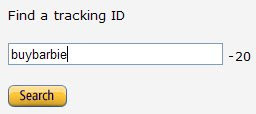
แล้วใส่ keyword ที่เราต้องการลงไปครับ ของผมขายตุ๊กตาบาร์บี้ ผมจึงใส่ว่า buybarbie แล้วกด Search (keyword ของผมคือ buy กับ barbie นั้นเองครับ)
Amazon Make Me Rich Lesson 2

ถ้าขึ้นคำว่า Congratulations, buybarbie-20 is available. Click the Continue button to return to your tracking IDs page. แปลว่าเราได้ร้าน aStore ขายบาร์บี้มาแล้วครับ ก็กด Continue ต่อได้เลย
แต่ถ้าขึ้นข้อความอย่างอื่นแสดงว่ามีคนตั้งร้านโดยใช้ชื่อนี้ไปก่อนแล้ว ให้เราตั้งชื่อใหม่จนกว่าจะได้ครับ แต่อย่าลืมควรตั้งชื่อร้านด้วย keyword สินค้าด้วยนะครับ (สามารถใช้ จุด กับ ขีด ขั้นชื่อร้านได้นะครับ จะถือว่าเป็น keyword เหมือนกัน เช่น buy-barbie-dolls, sale.barbie.discount, barbie-girl-cheap, buy.cheap.barbie.discount ฯล..)

5. จากนั้นตรงเมนูด้านซ้าย ตรง Tracking ID เราก็จะเห็นเป็นชื่อร้าน aStore ของเราออกมาแล้วครับ
Amazon Make Me Rich Lesson 2

Lesson 3 การสร้างร้านค้าออนไลน์ aStore Online